


Pad Mode Selectability

The Pad_mode setting is a unique feature available in Modelithics models that controls how solder pads are rendered within the layout environment. This flexibility allows designers to easily configure pad representations to match specific PCB layouts and simulation requirements, making EM/circuit co-simulation workflows more efficient. By providing control over pad rendering without altering the underlying model behavior, users can evaluate different layout scenarios while maintaining consistent electrical model performance. It is important to note that the Pad_mode setting affects only the physical layout representation and does not impact the simulated electrical response of the model.

There are Three Different Pad_Mode Settings:
  • 0 – Default to Sim_Mode  
  • 1 – Pads Always in Layout

  • 2 – Pads Never in Layout
Pad_Mode 0
(Default to Sim_Mode)

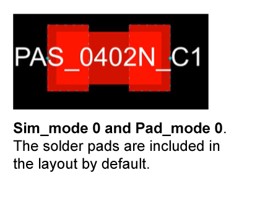
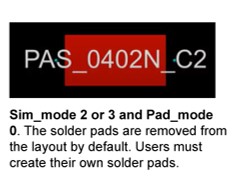
Pad_mode 0 is the default model setting in which the model defaults to the Sim_mode setting. With Sim_mode 0 (and Sim_mode 1), the pads are included in the layout by default. With Sim_mode 2 or 3, the pads are removed from the layout by default. Therefore, users must create their own solder pads when using Sim_mode 2 or 3 with Pad_mode 0.

Pad_Mode 1
(Pads Always in Layout)

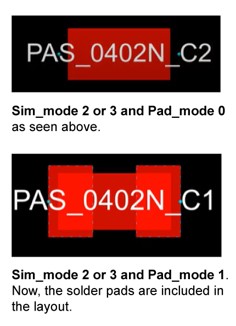
As stated, when Sim_mode is set to 2 or 3, the pads are removed from the layout by default. Pad_mode 1 overrides the default configuration by always including the pads in the layout. Consider the scenario in which the user wants to simulate with Sim_mode 2 but still leave the default pads in the layout for EM analysis. In this case, the user would want to set Pad_mode to 1. For more, check out the Short Waves or Deeper Dives video presentations that demonstrate an example.

Pad_Mode 2
(Pads Never in Layout)

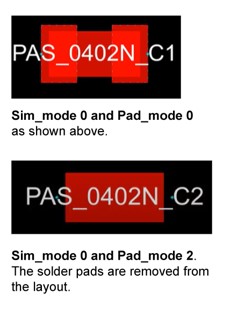
As mentioned, with Sim_mode 0 (and Sim_mode 1), the pads are included in the layout by default. Setting Sim_mode to 0 and Pad_mode to 2 overrides the default configuration by removing the pads from the layout. This configuration prevents the pads from wrongly being accounted for twice when simulating (i.e., both within the model AND in the EM analysis). When setting Sim_mode to 0 and Pad_mode to 2, the pads will only be accounted for within the model when simulating.

News and Resources

Explore recent news, design examples, videos, technical literature, including: application notes, blogs, published articles, white papers, and more. Discover the latest technologies, resources and insights to support your design and development efforts.

Design Faster With Measurement-Based Models

Access accurate, measurement-based models and services built for reliable RF and microwave simulation.

Modelithics Vendor Partners

Request a Model

Our new website is live

Welcome to Our New Website!

We’re excited to introduce our newly redesigned website, featuring improved navigation, enhanced resources, and a better overall experience. Explore the new site and discover what’s new.